
Start with keyboard height
Position the keyboard so the elbows and forearms can remain relaxed. Desk and chair height both affect the result.
Resources & Support / Product guidance
A comfortable keyboard position depends on desk height, keyboard slope, and how the wrists and arms rest during work.
What to consider
MMI’s guidance favors a neutral or gently negative keyboard slope. The goal is to reduce awkward wrist extension and let the arms rest comfortably.
Position the keyboard so the elbows and forearms can remain relaxed. Desk and chair height both affect the result.
A positive tilt raises the back of the keyboard and may encourage wrist extension. Try a flatter or gently negative position when the setup allows.
A keyboard tray, monitor position, chair, and task duration all shape typing posture. Adjust the workstation for the person using it.
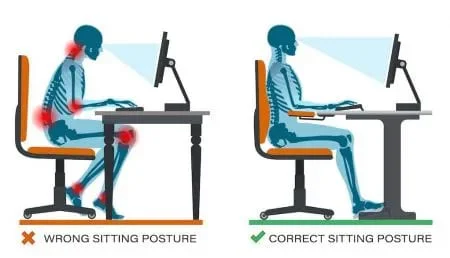
Posture at the workstation
Chair support, screen height, and the position of the arms and feet all contribute to a comfortable typing setup.